
|
 Home
Home
|
About Us
|
Contact Us
|
Our Clients
|
Links & Resources
|

|
|

|
Web Solutions & Pricing |
|
|
FileMaker Pro® Solutions |
|
|
Training Solutions |
|
|
Health Management Solutions |
|
|
Data Solutions |
|
|
Health & Wellness Solutions |
Contact Database
|
|
|
|
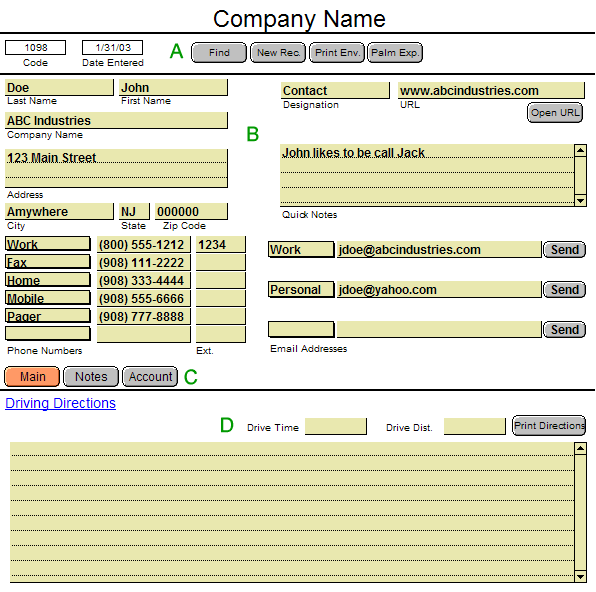
| A. Customized buttons that perform various tasks. | |

|
Used to search for contacts by any of the fields available on the screen. |

|
Used to create a new record to enter a new contact. |

|
Used to print an envelope with the contact's name and address. Gives the user a choice of a standard or 9 x 12 envelope. |

|
Used to import the contact information to a Palm Pilot® to eliminate double entry. |
| B. Contact Information Area. | |
|
- Contains all of the information about the contact. - Tab order is set to enable fast entry by utilizing the tab key to go from field to field. - Phone Number Type, Email Type and Designation utilize drop down lists to decrease data entry. 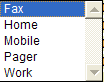 Phone Number Type
Drop Down List |
|
| C. Buttons Used to Navigate to Other Areas of Database. | |
| D. Driving Directions Area. | |
|
- Line by line directions can be input for future reference. - Directions can be printed with the Print Directions buttons which prints a sheet that has the directions as well as all of the contact's vital information. |
|
| Return to previous page. | |
 Renisar Technology Solutions, L.L.C., 2 Codington Lane, Glen Gardner, NJ 08826 Phone: (908) 500-9671 Email: info@renisar.com Copyright ©2002-2006 Renisar Technology Solutions, L.L.C. |
|